What a content plan is and how it can help a streamer grow an audience
Most people who run online broadcasts often ask themselves two questions: how to make streams better and how to attract more viewers? Today there are many tools that can help you not only deal with a lack of audience but also improve the content of your streams. One of these tools is a content plan.

Helps streamers grow
Published:
Many streamers are concerned with two important questions: how to make streams better and how to attract more viewers?
One way to both improve the quality of streams and expand the audience is to develop a content plan. That is what I will talk about in this article.
Why a streamer needs a content plan
A common problem for streamers is unsystematic delivery of content. This approach leads to a drop in average online, because the streamer’s audience doesn’t know when and what exactly will be broadcast on the channel.
To avoid this, streamers publish a stream schedule: that way viewers learn the plan of the upcoming streams in advance and can fit their daily routine around the content they are interested in. But to put together a good schedule that the streamer’s audience will like, you usually need to draw up a content plan first.
A content plan for a streamer is not just a stream schedule but also a list of what each stream will include. Every streamer has several types of audience with different interests. Some may be drawn by a particular video game, and others by musical talents. A plan of activities on the broadcast lets the streamer give each type of viewer exactly what they want.
A properly made content plan and a published schedule help a streamer analyze and improve content, and so raise audience engagement and increase the number of viewers.
Important: making a content plan is more useful for streamers with a large online and a mixed audience. For beginner streamers, although planning their activity is useful, it is better to focus on attracting a new audience.
A weekly stream schedule
A schedule differs from a content plan in having no predefined content. But without a schedule the streamer will have nothing to fill, so it is better to start with it.
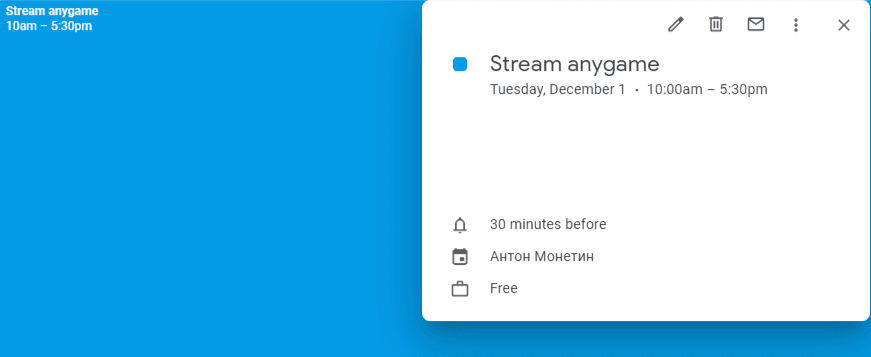
An item in a stream schedule
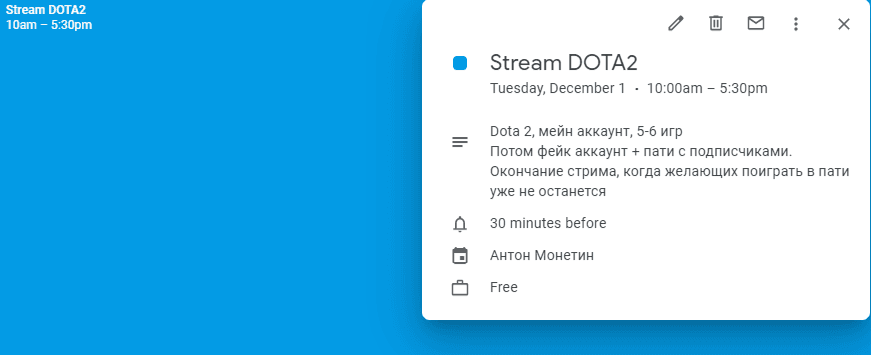
An item in a content plan
First of all, a streamer needs to find the best time frames for streams. To work out how to choose the day and time for broadcasts as effectively as possible:
1. Define the time slots you can devote to streaming
Think carefully about when you are ready to stream. It is productive to stream not now and then but at set times, because random broadcasts lose value in the viewer’s eyes, and frequent notifications tire subscribers. So going live every free hour is a bad idea.
2. Analyze the prime time of the most popular streamers in your categories
The more popular streamers are online at a given time, the lower the chance of getting near the top of the main pages of Twitch categories. Study the top streamers in your category, their schedule and prime time. For most popular streamers this information is easy to find in the channel description or on social media.
3. Track the times of consistently high and low activity in your categories
The chance to attract new viewers is highest in exactly these time slots: in periods of high activity the category has peak viewer numbers and draws interest from viewers of other categories, and in periods of low activity the “old-timers” of your category look for new content. The service twitchtracker.com is handy for the analysis.
Sometimes a spike in activity in a category is caused by a special event, for example a tournament. It is useful to take such events into account when making a schedule and analyzing results.
4. Make a schedule
Once you have collected all the data, you can make a schedule. Try to include periods of high activity in your category but low activity of the top streamers. This could be the period right after a popular streamer’s stream ends or a few hours before it starts.
Main mistakes when making a schedule that spoil everything:
Overestimating your capabilities. Don’t put a 12-hour stream every Monday into the schedule unless you are sure you will be able to hold it consistently.
Too much influence of popular streamers’ prime time. Minimizing overlaps doesn’t mean you have to go live at four in the morning and switch off three hours later when the top streamers of your category wake up.
A radical change in broadcast times. Remember: your audience is used to your approximate schedule, so a time shift of 6+ hours can cause viewers to leave.
Activities on streams
For the schedule to turn into a content plan, you need to outline what you will do during the streams. As a rule, filling a channel with content involves:
Streams with your regular content — every streamer has main categories that keep a stable audience. As a rule, such streams take from 75 to 90% of all stream time;
Additional segments — activity that happens on streams from time to time but is also part of your regular content;
One-off events — when the content is completely outside the usual framework of your streams. An example is an avid esports player going live IRL from a gym.
You need to understand clearly what exactly each of your streams consists of. It will help you better figure out how to distribute content across the schedule. It will be convenient if you describe in detail in the content plan everything that happens on your broadcasts.
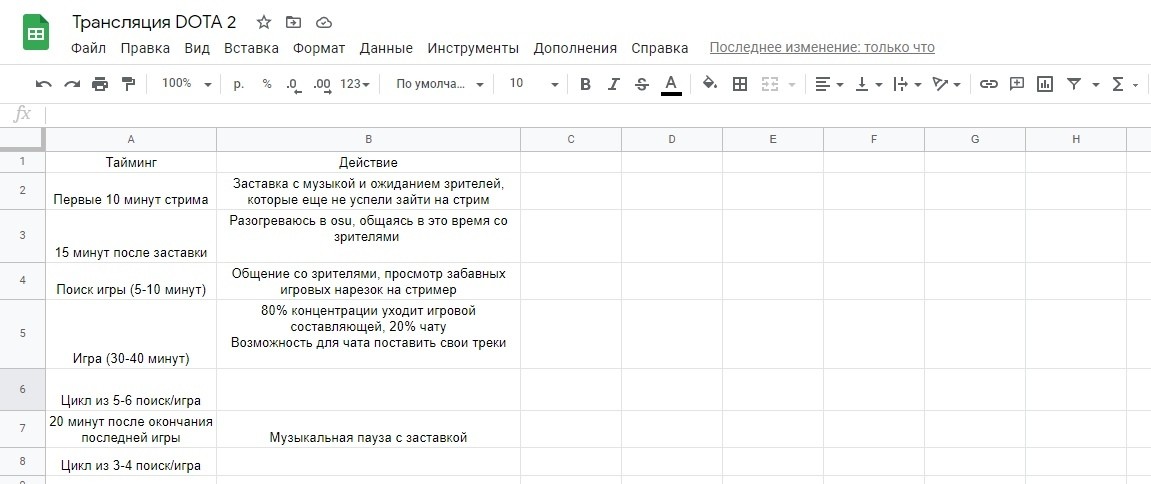
A plan of activities on a stream
It is better to start by describing what you do on streams now. If you stream Just Chatting on Thursday evening, write exactly that in the content plan. This will help you not to lose current viewers who are already used to your schedule.
In the end you should have an orderly digest of your content. It will come in handy for analyzing the link between changes in online and your actions, which will help you work on the content itself more effectively.
Analyzing the results
1. Collect metrics
For a content plan to be useful, it needs to be improved. And for that you need to analyze it regularly to assess how well it works.
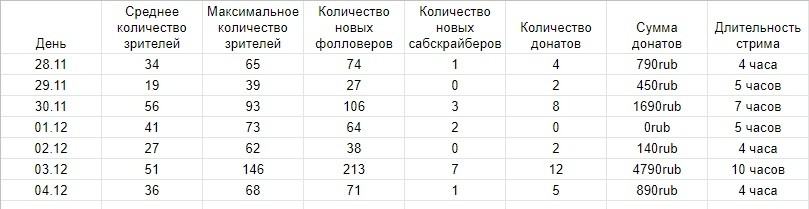
In the creator dashboard of any streaming platform you can usually find statistics on past broadcasts. It is best to track for each broadcast the average online, peak online, the number of new followers and subscribers, and the amount and number of tips. It will be convenient to put together a document like this:
2. Find spikes in online on regular streams
It is important to identify periods of growth or decline in the number of viewers on regular streams. It is easier to understand with an example. Here are the charts of two real streams, identical in content and start time:
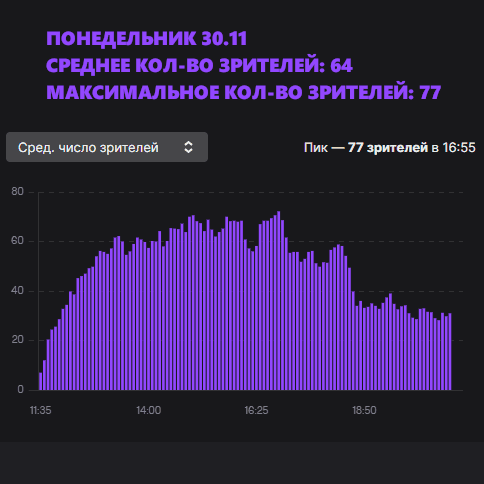
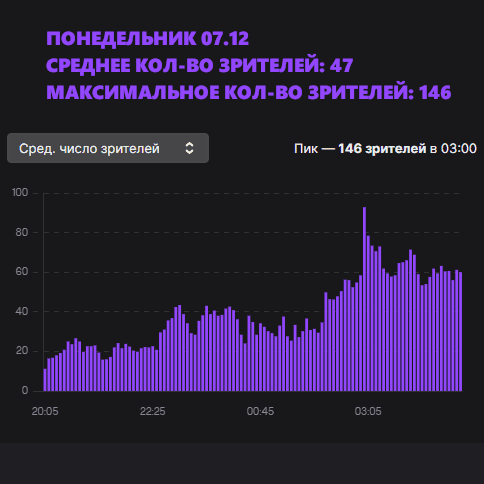
The difference between them is that the first stream had a colorful announcement and a small giveaway in the first half hour. Judging by the charts, this gave a substantial gain in viewers at the start of the stream.
A noticeable gain in viewers points to heightened interest in what you do, and an outflow points to a drop in content effectiveness. Your task is to find out what causes the changes in online. Many factors can affect audience size: an announcement, the category, music on the stream, extra interactivity or something else.
3. Draw conclusions from the statistics
Data analysis will help you understand the dynamics of your channel. Positive dynamics can be considered growth in viewers, subscriptions and viewer activity on streams. This means your viewers like the current content and you can give it a bit more attention than before. Negative dynamics, on the other hand, point to a fading interest of the audience — which means something needs to change.
But regardless of the channel’s dynamics, it is worth looking in the statistics for particularly successful streams and trying to understand what led to high numbers that time. And you can try to repeat the success.
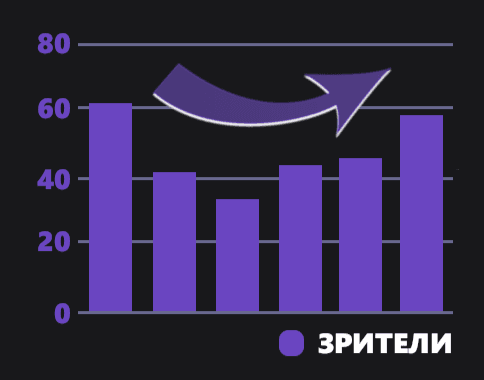
Important: don’t change your content plan too often, because you won’t have time to get statistically significant results. A great solution is to make an approximate stream plan for a month and then edit and add to this plan every week.
Improving the content plan
Everyone knows there is no limit to perfection, which means there is always something you can and should improve. Don’t be afraid to experiment, keep track of your audience’s mood and use statistics to improve your content plan.
Collect feedback. You can get it through polls on your social media, by asking viewers questions directly during the stream, and through Twitch polls.
Define success indicators. The main indicators that you are doing everything right are growth in average and peak online, in the number of followers and subscribers, and higher viewer activity on your broadcasts.
Don’t be afraid to experiment. Add new segments and see how well your audience takes them. Change the usual time of regular activities and track the results.
Try new formats. For example, create a poll every hour and do whatever the audience chooses. Or you can simply chat with viewers, tell them about your life, and maybe even invite someone to a voice chat.
As a rule, the audience notices positive changes in content from its favorite streamers quite quickly. Viewers tend to pay much more attention to a broadcast if you listen to their opinions and needs.
Donatty public API: your own bot for tips and goals
Your channel's tips, goals and tipper leaderboard can now be pulled into your own program: a bot, your website or another service. Here is what you can build and where to start.
Read more
Donatty ambassador program: free PRO plan
Tell your audience about Donatty — and we give you the PRO plan. Any channel with 100 or more followers qualifies. Here is what PRO includes, what you need to do and how to join.
Read more

November 7 release: fee compensation and two new alerts
Fee compensation is now visible in Finances, and tips with compensation and tips with media can have a separate alert. We show it in a video and explain how to set it up.
Read more