Twitch: how a small channel can establish itself on the platform
A streamer’s research into which tricks to use on streams to keep your existing audience and attract a new one

Streamer
Published:
Hi!
My name is Nastya, and on Twitch I’m better known as Anaskella. In late spring ’21 I decided to look into the question “What really matters to a viewer on streams, so that they want to come back to you and support you?”.
I stream myself, and I was curious to find out which of the most common mechanics you can see on streams really influence the viewers of streamers in a particular genre.
N.B. This was a full-fledged study by all the standards of research universities, with theories, frameworks, hypotheses, SPSS and so on. In some places I deliberately leave out explanations, because otherwise you could read the article until tomorrow.
Let me say right away that there is no magic button here that you press and your online instantly grows and all viewers start watching only you.
Small channels have a huge advantage — high-quality interaction with the audience. You know your viewers better than anyone, because you talk often. If you want to understand why people watch you, what your audience likes and what they would want — ask. Get to know your viewers, because behind them are people with their own wishes and needs, and discovering and understanding them can help you solve the problem of stagnation and understand how to stream and grow further.
Which channels took part in the study?
The streamer plays video games 90% of the time. I avoided channels where video games are not the specialization;
The streamer plays single-player games alone, talking with the chat at the same time. I didn’t study channels where many people can stream or co-ops are frequent — interaction with the chat is worse there;
In total 6 channels (names hidden), average online viewership 25-30 people.
Which viewers’ influence was studied?
Watches at least 1 hour of streams a week, so that they can be called active;
Watches small streamers whose online is up to 100 people;
In total 277 people gave representative answers.
What was measured?
Two viewer resources are taken into account: time and money.
The term “Sense of community / Sense of belonging to the channel” is considered, made up of two parts: “The viewer is ready to watch this streamer’s streams more often” and “The viewer is ready to become a paid subscriber or to tip”.
How was it measured?
The survey offered a description of a mechanic and a choice of degree of agreement/disagreement with a statement. Those who answered “Doesn’t matter” did not take part in the further analysis.
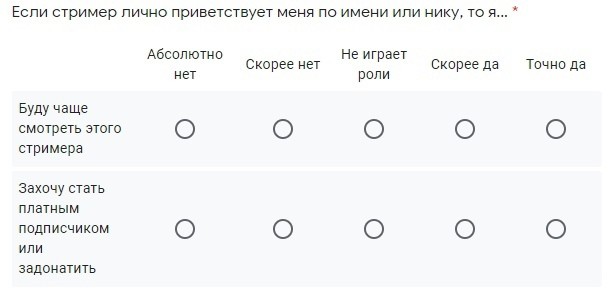
An example of what a question to a viewer looked like
Where do the mechanics come from?
As you watch several channels and streams, you see a pattern (on purpose I watched about 30 streams with a notebook in hand). Experts who now work as community managers and are experienced streamers themselves also helped a lot. The mechanics were divided into those implemented in the chat and those implemented by streamers.
Together we found 23 mechanics: 13 streamer mechanics, 11 chat mechanics.
Which mechanics were studied and what they mean
Wait, why were they divided into streamer mechanics and chat mechanics at all?
The thing is that among the streamers I know there is a question: is your own contribution as a personality enough, or do you still need to develop the features on offer? If it is still unclear, here is a crude example: is it enough to be a skilled driver to successfully drive any car, or does a lot depend on the car too?
Streamer mechanics:
Implemented by the streamer or in the stream window.
Openness. The streamer’s readiness to tell personal stories from life and their feelings, to be open to conversation about themselves.
Frequent communication with viewers. This includes talking to the chat, answering questions on any topic, taking part in or starting a discussion, asking the chat questions.
The streamer’s charisma. The manner of running the stream, command of voice, appearance, topics of conversation during the broadcast. Put simply, the answer to the question “Do I like the streamer as a person and a friend?”.
Sound alerts on the broadcast and personal thanks for money spent. This includes “Thanks for the follow / subscription / host / raid / tip / bits” and everything you can set up an alert for. The main thing to remember is that this is the combination of both an alert and a personal thank-you.
Personal addressing. Personal greetings to viewers with a mandatory mention of the nickname or name (if known and the viewer doesn’t mind), as well as personal questions directed only at that viewer. A clear example: you know that your viewer with the nickname Chevapchich recently came back from vacation and you ask “How was your trip to the seaside?”.
Running special themed events. Here the event is limited only by the streamer’s imagination; the most common ones: a week of games chosen by viewers; challenges from viewers; game auctions; a themed week of games.
A reward for money spent. If a viewer has supported financially, they get access to a unique possibility. Popular forms: ordering a game, sub days/weeks, awarding a VIP badge.
A filled-in Bio block. This is the whole field located right under the stream. Streamers often write about themselves, the channel’s goals, the schedule, how to support and what the benefits are, provide links to social networks and add some widget.

An example of a Bio
Interaction in games. Playing games with some people from the chat, games with chat integration (Dead Cells, Domina). There is an interesting form of the same mechanic where game characters are named after viewers from the chat.
A webcam on the stream. With the streamer’s face to convey their emotions, not with a figurine or a GIF.
A presence on other platforms. Outside streams, viewers need somewhere to gather to talk with the streamer and each other or just to keep up with events. Such places can be Discord, VKontakte, Instagram, Twitter and so on.
Fundraising for a specific goal. Colloquially, tip goals and sub goals.
Statistics on the stream screen. The latest follower, the latest tipper, the latest sub, the latest host, the latest raid, the total number of subs and… you can go on forever. Such statistics are placed directly on the game screen, not on the intro screen.
Chat mechanics:
The chat is the place where viewers write messages (chatbox). When I say chat, I don’t mean the people.
Atmosphere. A hard-to-isolate mechanic, in which the chat is nevertheless people (how cleverly I got you there, huh!). The way viewers communicate in the chat, the tone of messages, the topics of chat conversation. Put simply, the answer to the question “Do I like the people in the chat?”
Custom emotes. Emotes that exist only on this channel and are given for a paid subscription. Ideally they should be associated only with a particular channel.
Custom badges. Badges next to paid subscribers and cheer donors that are made to fit the channel’s theme, rather than from the Twitch template that simply shows a star.
An interactive chatbot. A bot you can trigger! with commands and play with. What matters here is the entertainment side: roulette, predictions, random text, a sound command, triggering another viewer and so on.
An informational bot. It is responsible for information: how to subscribe, what you get for it, what social network links there are, how to tip and so on. You can’t have fun with it, but it does important work — reminding and informing.
The “Hype Train” feature. This is rare on small channels. An event activated on the channel when several simultaneous subscriptions from different viewers are made, the aim of which is to fill the bar that appears in the chat through paid subscriptions and bits tips.
Polls. Either with a simple choice of answer or with an extra boost and spending channel points and bits.
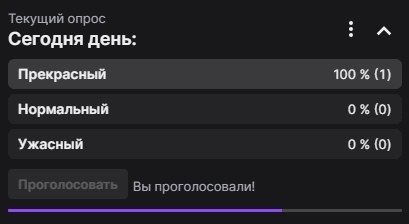
A poll
What really matters to a viewer?
Viewers answer.
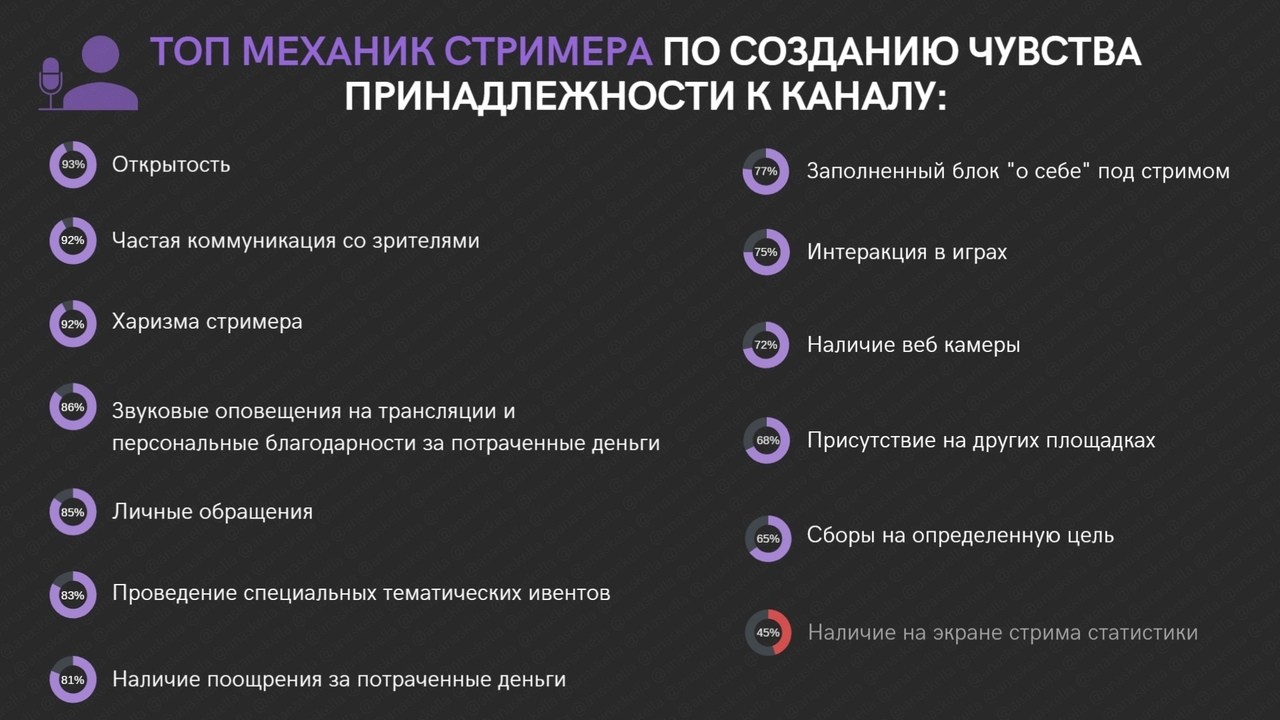
Everything on the left of the table is primary and important. The rest is a nice bonus and addition, and some things are even irritating.
I assume that not all streamers can present the statistics of the latest action on the stream appropriately, so it looks out of place and is rather irritating.
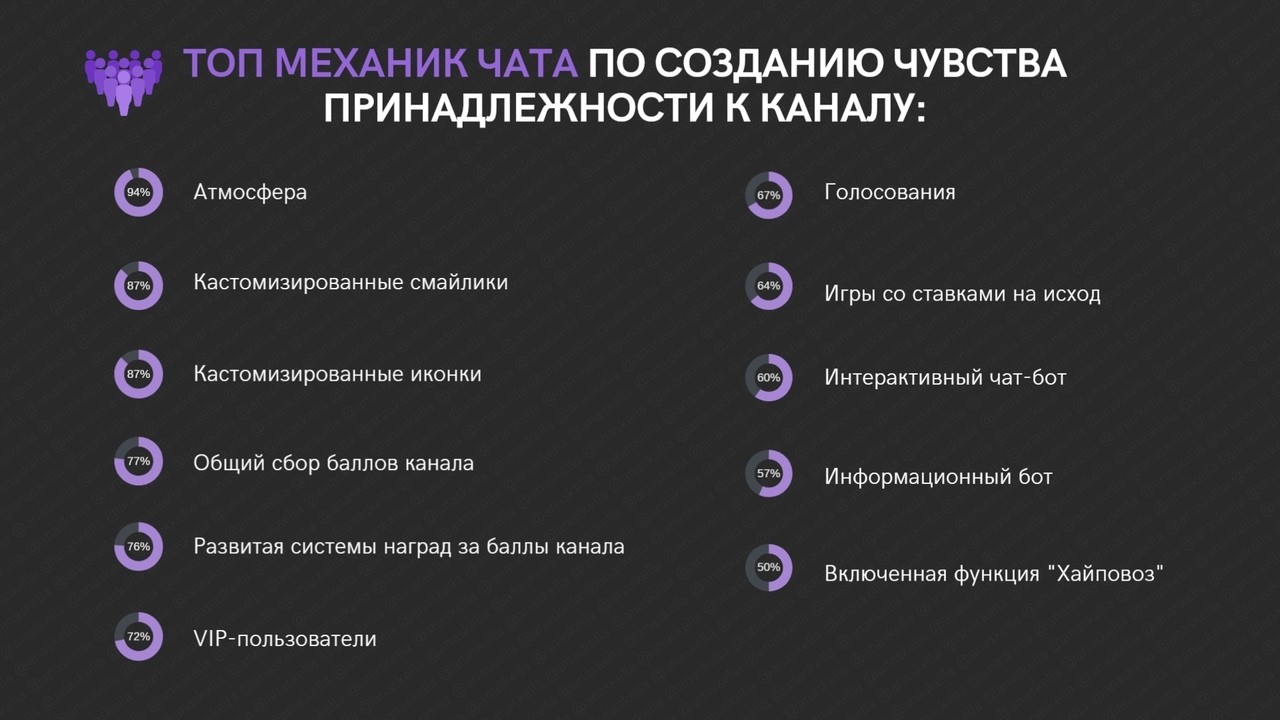
Same story — purely mathematically, the left part is more important than the right. Logically, both are valuable and complement each other.
So what do we get?
The conclusion is simple: both the streamer and the chat are almost equally important for creating a viewer’s sense of belonging to the channel. I advise you to use all the mechanics that scored above 50%. If you ever thought of ignoring channel point rewards with the words “nobody sees them anyway”, remember that for 76% of people this mechanic makes them come back to you more often.
12 streamer mechanics + 11 chat mechanics = very good ground for thriving. When I did the study, I called it a “powerful foundation”.
The situation varies from channel to channel: somewhere a certain mechanic will matter more, somewhere less. It was not for nothing that I mentioned at the start that you know your audience best. However, remember that they all complement each other and there are none that you categorically shouldn’t use on your channel.
I hope I helped bring a drop of clarity on how a small channel can establish itself. If you have questions, I will be glad to answer them. If you don’t, I will be glad to get to know fellow streamers, feel free to add me.
Try, make mistakes, analyze, ask and try again — that is how you can find yourself and move toward your goals.
Donatty public API: your own bot for tips and goals
Your channel's tips, goals and tipper leaderboard can now be pulled into your own program: a bot, your website or another service. Here is what you can build and where to start.
Read more
Donatty ambassador program: free PRO plan
Tell your audience about Donatty — and we give you the PRO plan. Any channel with 100 or more followers qualifies. Here is what PRO includes, what you need to do and how to join.
Read more
November 7 release: fee compensation and two new alerts
Fee compensation is now visible in Finances, and tips with compensation and tips with media can have a separate alert. We show it in a video and explain how to set it up.
Read more