The ultimate guide to monetizing streams on Twitch
We go through the ways to monetize streams on Twitch: paid subscriptions, Bits and built-in ads. And also Hype Train, emotes, channel points and community rewards.

Streamer and content creator
Published:
Twitch is one of the most popular and biggest platforms — no wonder most streamers pick it as their base for broadcasting. But how do you become more effective and start earning on Twitch? What monetization options and in-platform tools are there? Let’s find out.
Contents
1. Twitch Partner and Affiliate statuses
2. Twitch paid subscriptions
3. Twitch gift subscriptions
4. Twitch Bits
5. Built-in ads
6. SUBtember
7. Hype Train
8. Emotes
9. Channel points, rewards and community challenges
10. In conclusion
Twitch Partner and Affiliate statuses
All monetization on Twitch depends directly on partnership status with the platform — that means Affiliate or Partner. Thanks to these cooperation programs with Twitch, streamers are able to monetize their income.
Twitch Affiliate is a status that gives a streamer access to the main built-in mechanisms for monetizing content — paid subscriptions, Bits tips and ad breaks. It also unlocks channel points and lets you run polls or votes, premieres and stream replays. You can find the conditions for Twitch Affiliates in the streamer dashboard.
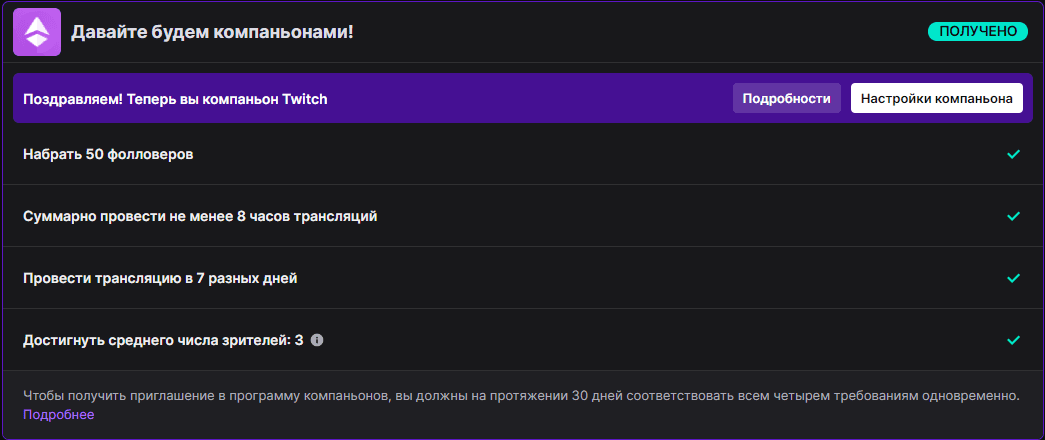
You can find the conditions for Twitch Affiliates in your streamer dashboard
To get Affiliate status, a streamer must meet the following conditions over the last 30 days:
at least 500 minutes of streaming;
at least seven days with unique streams with three or more concurrent viewers;
at least 50 followers.
You can read more about the Affiliate program on the Twitch website.
Twitch Partner is a status that gives more custom emotes on the channel and the ability to store stream recordings for 60 days rather than 14 like everyone else. Moreover, partners get a “checkmark” next to the channel name and can create squads (teams of streamers), and the platform’s support answers them faster.
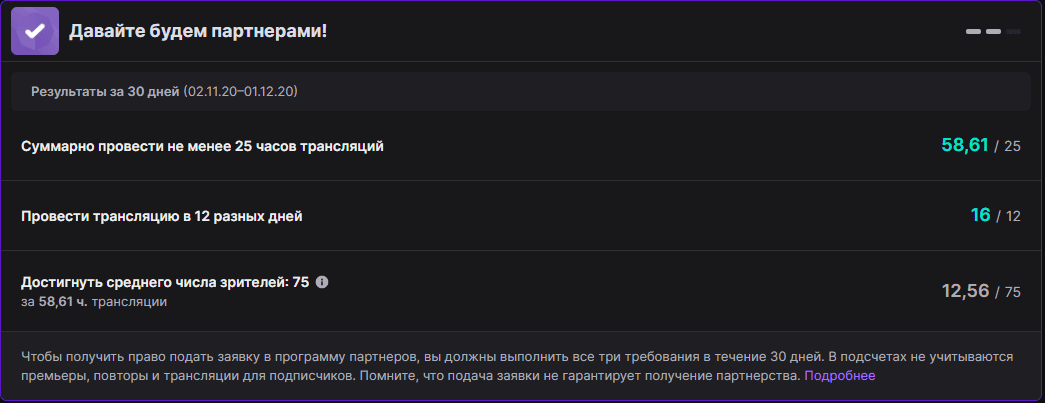
Conditions for Twitch Partners
The requirements for partners are higher than for Affiliate status. You need to stream at least 25 hours in total, stream on 12 different days and have an average of 75 viewers. Meeting these requirements does not mean automatic approval of your status: the platform reviews all applications manually.
You can read more about the Partner program in the Twitch guide.
Important: by becoming a platform Affiliate or Partner, you accept an additional agreement. Here are some curious clauses of this document:
Not to stream your content or post it anywhere other than Twitch within 24 hours after a stream on the platform.
Links to products may be placed under your stream without your permission, and if they are bought through that link, you may receive a reward.
Twitch gets exclusive rights to distribute your content to its users and to sell and show ads on it.
Many of the rights that Twitch gets from you are exclusive. This means, for example, that nobody except Twitch has the right to run ads on your streams on this platform.
If a streamer violates this agreement, the platform reserves the right to take the funds that it would otherwise have paid you.
The platform can also block your channel, so it is better to study carefully and follow the clauses written in the agreement.
Twitch paid subscriptions
Paid subscriptions are a way for a viewer to directly support a favorite streamer’s channel. By taking out a paid subscription, a viewer gets access to a number of privileges:
subscriber badges on the channel;
the channel’s unique emotes;
subscribers-only chat mode;
turning off Twitch’s standard ads;
A viewer takes out a subscription based on their preferences and financial means. There are 3 subscription tiers: Tier 1, 2 and 3 — the higher the tier, the more expensive the subscription but the more cosmetic bonuses.
You can subscribe for one month or right away for 3 or 6 — the more months, the lower the price. For example, a Tier 1 subscription costs $4.99, for three months at once it costs $9.99, and for six months $24.99.
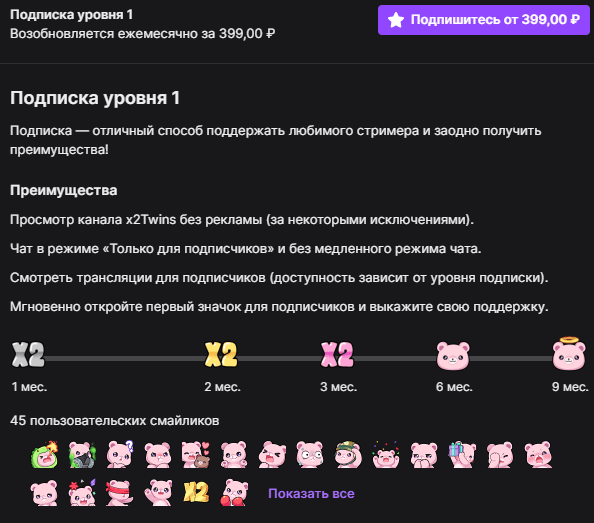
Custom emotes on a Twitch Partner’s channel
Why a streamer needs it. Paid subscriptions are the main way to monetize streams on Twitch, comparable in effectiveness only to direct donations through third-party services.
The advantage of paid subscriptions is that when a user subscribes to a channel, a certain amount for the chosen subscription reaches the streamer every month. This lets a streamer predict their own income on Twitch and makes earnings stable.
Keep in mind that the streamer gets only 50% of the subscription amount, and the other 50% goes to Twitch. And this applies not only to subscriptions but in general to all ways of earning on the platform.
How to use it best. For viewers to subscribe to your channel more, every subscription should bring positive emotions and be an event on your stream. And existing subscribers should feel special.
To do this you can:
Set up a beautiful subscription alert
Thank every subscriber: with words, a gesture ???, a cute song or even a dance
Sometimes hold subscriber-only streams or, on game streams, play on the same team with them
Twitch gift subscriptions
Any user can gift subscriptions to a favorite streamer’s channel. The person who buys one as a gift can choose the recipient — a specific person or a random viewer (one of the streamer’s followers). In the latter case the gift goes to someone at random.
A gift subscription costs the same as a regular paid one and doesn’t differ in privileges. The person who receives the gift becomes a “temporary” follower until they decide to pay and renew the channel subscription themselves.
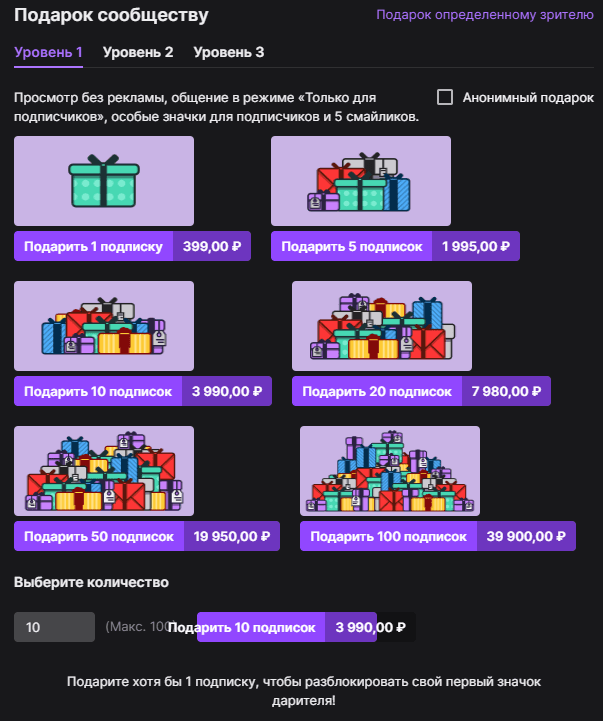
Why a streamer needs it. Gift subscriptions bring the streamer as much money as regular ones. But their plus is that the recipient gets a taste of all the charms of a paid channel subscription, and that raises the chances of renewing on their own.
Gift subscriptions are given by the viewers to each other. It is a way to show a favorite streamer how much the giver is ready to invest in the channel’s success. Such an audience always stands out from the rest with a unique icon in the chat.
How to use it best. It is hard for a streamer to influence the number of gift subscriptions. But what is definitely worth doing is thanking viewers from the heart and telling them how valuable their contribution is.
There are often discounts on gift subscriptions, sometimes personal ones. Streamers learn about them directly from Twitch mailings. It is worth telling your viewers about promotions, since they are always time-limited.
More about gift subscriptions — in the Twitch guide.
Twitch Bits
Bits are Twitch’s in-platform currency, bought with real money. When you buy a certain amount, Bits go to your electronic wallet account on Twitch, and now you can spend them as you see fit.
Prices as of November 2020 are these: 100 Bits cost 108.8 ₽, 500 Bits — 544.05 ₽.
Viewers can spend this currency on Cheer messages in the chat to support the streamer, mark the best moments or make their messages stand out from the crowd.
When a viewer sends a Cheer message, animated Bits gem emotes, Cheer emotes (animated versions of the platform’s popular emotes) or custom Cheer emotes (available to partners) appear in the chat.
A streamer definitely won’t miss Cheer messages and will react positively, since they are always shown on the broadcast screen, like any other tip or subscription.
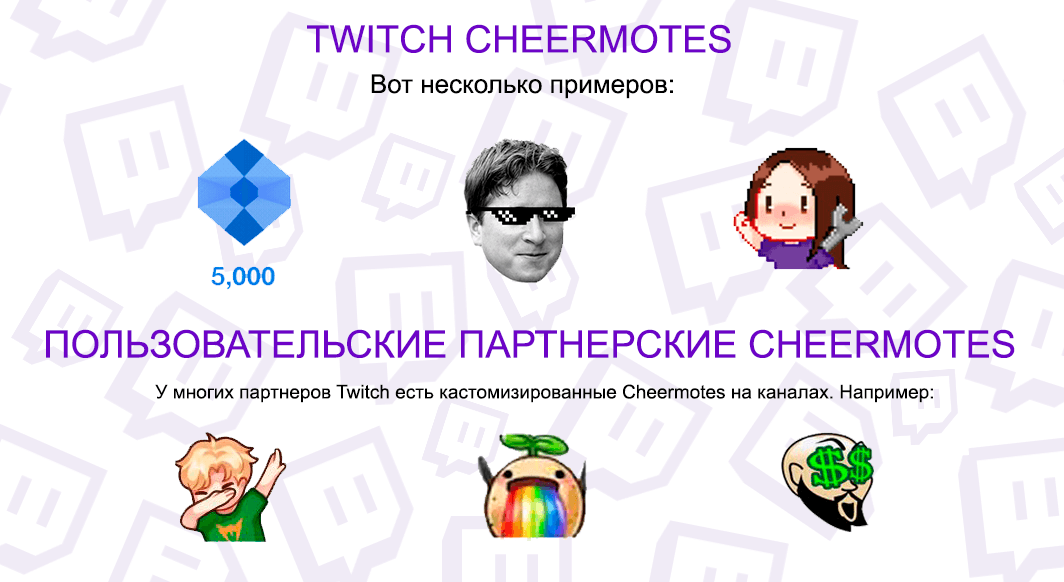
Why a streamer needs it. Bits are a very handy tool when it comes to donations. In essence they are an analog of tips through third-party services. However, the downside of such virtual currency is that the streamer gets only $0.01 for each Bit used in the chat.
How to use it best. Perhaps Bits matter to streamers more as a way of interactive communication with their audience, while the chance to earn takes a back seat. You need to set up a Bits alert on your stream so that they are visible not only in the chat but also during the broadcast itself.
Remember: Bits cost a viewer much more than the streamer gets. So the fact that the audience spends its currency to support you specifically is very significant and valuable.
When Bits are sent to a streamer, a random emote giveaway may start on the channel. It doesn’t depend on the streamer or viewers in any way, but this feature should also be used wisely. Encourage those who donate Bits, tell them about the possible benefits your viewers can get by sending Cheer messages.
More about Bits and Cheering — in the Twitch guide.
Built-in ads
Twitch Partners and Affiliates, regardless of the number of followers, can start earning from built-in ads. Note that it is integrated into Twitch, so you can’t influence the content of the videos the platform shows on your channel.
Ads are launched in the dashboard with one button click. We should add that the streamer can set the length of the ad break they need. Twitch advises starting with a minute and later gradually increasing it to three minutes.
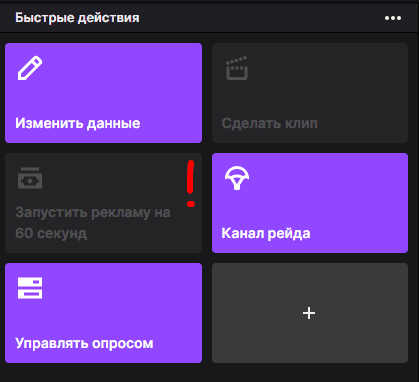
This is what the Run Ad button looks like in the streamer dashboard
Why a streamer needs it. Whether to use ads during a broadcast or not is entirely your decision as the channel owner. If you want, you can turn off ads for subscribers as an extra privilege. This way of rewarding is very popular among Twitch Partners and Affiliates, so many users consider it a mandatory bonus for subscribing.
Ad blocks can last from 30 seconds to three minutes, and the income the streamer gets for them depends on the number of views: the more people see the ad, the more you can earn.
How to use it best. It is more effective to hand over launching ads to bots or moderators (for example, Nightbot or Moobot): that way you won’t forget to do it once an hour and can earn more effectively.
It is better to use several short videos in the middle of the broadcast, when you have peak online, rather than at the start or the end. That can raise your income, since it depends directly on how many people watched the ad. But don’t overdo it, otherwise viewers will start leaving.
More about built-in ads — in the Twitch guide.
SUBtember
From time to time Twitch runs various promotions for subscribers, and “SUBtember” is one of them. Every September viewers can take out paid subscriptions to all Partner and Affiliate channels at a 50% discount. It is more profitable to use such a subscription for half a year or a year ahead.

Why a streamer needs it. “SUBtember” didn’t become one of the most popular discount programs on Twitch for nothing. A 50% subscription discount is a good deal for a viewer, and it is a great moment to gain subscribers. The promotion lets both sides win: viewers subscribe at a discount, while the streamer still gets the full price (minus Twitch’s commission).
How to use it best. It is important for a streamer to announce this opportunity on their channel and “mentally prepare” their viewers for this period. Of course, you shouldn’t “force” viewers to subscribe to you in an aggressive manner. It is best to remind them of the good offer unobtrusively during streams and on social media.
A few details about SUBtember 2020 — in the Twitch blog.
Hype Train
“Hype Train” is a way to engage the audience and reward those who actively support the streamer financially. It is a special event that starts automatically if, within a short time, viewers begin actively subscribing or sending Bits.
Each streamer sets the threshold from which a Hype Train can start. However, one person can’t start it alone: for the Hype Train to set off, support events on the channel must come from several viewers at once.
The Hype Train is fueled by:
Cheer messages;
paid subscriptions;
gift subscriptions.
All Cheer messages raise the “hype meter”, but to get reward emotes you need to send at least 100 Bits in total.
Donations through third-party services don’t charge the Hype Train.
When the Hype Train sets off, all viewers of the channel can start charging the hype meter by taking out subscriptions, gifting to the community or using Bits. If the bar is filled in less than five minutes, the Hype Train moves to the next level, after which the timer resets — and a bigger hype meter appears. If the first level is not reached, nobody gets the gift reward emotes.
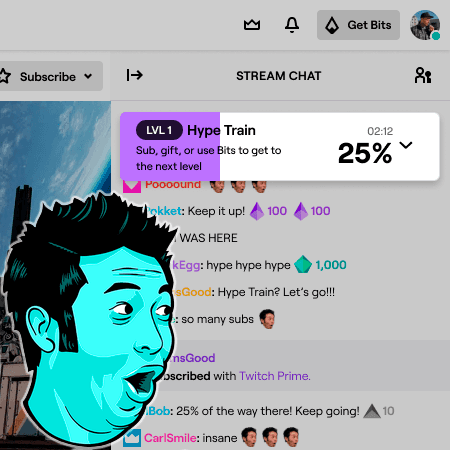
A Hype Train looks something like this
Why a streamer needs it. A Hype Train is a useful mechanism for stirring up excitement on a stream. Viewers start to feel like a community and achieve a result together. This stimulates them to impulsive tips and subscriptions that in other circumstances might not have been made or been made later. And it is also fun.
Of course, streamers are always pleased when a Hype Train starts on their channels, because it means their content is liked by viewers and that the viewers are ready to support the streamer financially. In return, viewers can always get emotes from Twitch, and that is extra motivation to act.
How to use it best. A Hype Train is a unique event in the chat during a broadcast, and it can happen only thanks to the generosity of your subscribers. Set up your Hype Train so that it doesn’t start too often or too rarely, otherwise it will either be too much for your audience or quickly become boring.
Be sure to thank every giver, every subscriber, everyone who sends Cheer messages! That way you will not only raise the audience’s loyalty but also simply show how much you value your subscribers’ help.
While the Hype Train is charging, it is important for the streamer to keep the broadcast active, encourage donations and build up the atmosphere so that viewers don’t slow down.
More about Hype Train in the Twitch guide.
Emotes
Emotes are a powerful motivator to buy subscriptions to streamers’ channels, because they are a distinguishing mark of a particular streamer’s subscriber.
However, there are many different ways to get free emotes from the platform: for example, emotes are given at random to viewers in the chat after any paid subscriptions, Cheer messages or after a Hype Train.
Twitch also holds many in-platform events, for taking part in which viewers get unique emotes. So you should tell your viewers about them too.
For example, at the start of autumn 2020 there was a promotion in support of the LGBT community, and many viewers got unique LGBT-themed emotes to suit any taste. In November 2020 there was a promotion for K-POP fans, so viewers could add Korean-music-themed emotes to their collection.
Some emotes can be earned by watching special events or official channels that show not-yet-released games, or esports tournaments.
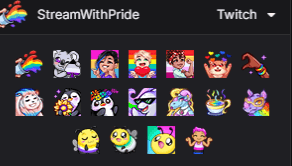
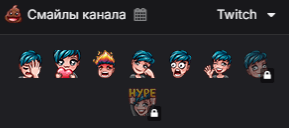
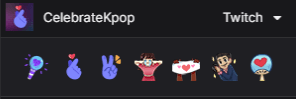
Why a streamer needs it. If you are a Partner or Affiliate, emotes are especially important for you. You need to make them part of your style, matching your content, which is what interests subscribers first of all. Remember that viewers pay to subscribe to any channel first of all for unique privileges, and emotes are one of them.
How to use it best. The better the quality of the emotes, the bigger the buzz among subscribers. It is great if you can draw them yourself or order the image you need from an artist. The main thing is to remember the requirements for emotes and not to violate anyone’s copyright, as well as Twitch’s rules.
Remind your audience that emotes exist, and don’t forget that the more subscribers you have, the more emotes you can make for them.
More about emotes in the Twitch guide.
Channel points, rewards and community challenges
Channel points are a powerful way to reward the audience and involve viewers in activities held on the channel.
Viewers get points for watching streams, subscriptions, Cheer messages and taking part in raids.
For viewers to be able to use them, the streamer needs to come up with rewards and set their price in points. A viewer who has accumulated the needed number of points can claim the reward they want. Usually these are emotes, the chance to highlight your message in the chat or to choose the next game. But sometimes it can be a mug with the channel’s logo, a “sign” or even an iPhone.
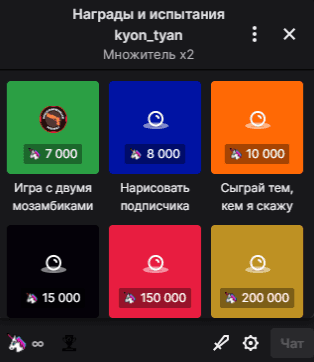
The rewards on my channel
Community challenges are collective rewards for the streamer’s whole community, where every viewer can make their contribution in points. Such challenges usually match the stream’s main content: for example, “play as a certain character”, “dance on stream”, “sing karaoke” and so on.
Why a streamer needs it. Channel points let a streamer both attract a new audience and entertain their regular viewers and subscribers on an ongoing basis.
If you pick interesting or valuable enough rewards, they will motivate activity that is useful for the channel. Even if not all the activity that earns points brings the streamer income directly, the value of views or of taking part in raids is hard to overestimate.
How to use it best. It is worth making rewards for points unique and giving them an entertaining character first of all.
It is important that the channel’s point rewards include both cheap and expensive items. That way subscribers will have more motivation to stay on your streams and keep watching you.
If you create a new reward or it is taking a long time to collect points for one of them, be sure to remind the audience. As a rule, viewers often forget that the channel’s bonuses exist, so it is important for the streamer to encourage subscribers who use points.
More about channel points — in the Twitch guide.
In conclusion
Twitch’s built-in monetization is a set of tools, each of which can be very useful to a streamer. Some of them generate income directly, such as subscriptions or Cheer messages. Others help reward viewers for activity and loyalty: for example, emotes or special icons in the chat. Still others stimulate user activity — these are the Hype Train, channel points and community rewards.
Using these tools correctly will help grow the channel and significantly increase income. So onward, to new victories and achievements!
Donatty public API: your own bot for tips and goals
Your channel's tips, goals and tipper leaderboard can now be pulled into your own program: a bot, your website or another service. Here is what you can build and where to start.
Read more
Donatty ambassador program: free PRO plan
Tell your audience about Donatty — and we give you the PRO plan. Any channel with 100 or more followers qualifies. Here is what PRO includes, what you need to do and how to join.
Read more
November 7 release: fee compensation and two new alerts
Fee compensation is now visible in Finances, and tips with compensation and tips with media can have a separate alert. We show it in a video and explain how to set it up.
Read more